Author Archives: admin

Caller ID

Imagine front desk staff having a patient’s name, address, account balance, next appointment details, appointment history (including failures to attend) , whether or not the patient has a medical card (and if they have, how many fillings they are eligible for) in full view before picking up the phone to answer a call from that patient.

All that before even saying hello.

That’s what the addition today of caller id functionality to Panara gives you.

We discussed putting this feature in the program last May in Galway and the biggest delay has been sourcing a suitable modem.

Try asking, as I did many times, for a modem with caller id functionality in a computer supply shop and you’ll be met with a vacant gaze followed quickly by a request for your name and number so they can get back to you. Nobody called.

Eventually I came across this Zoom modem (model 3095) which is an external USB modem.
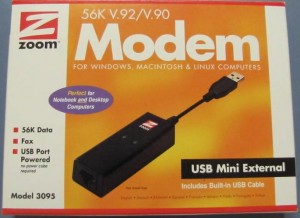
zoom modem

zoom modem

If you can’t get one locally then there are usually vendors on ebay willing to ship to Ireland. Total cost should be under €50. One modem per practice will be required.

Installing the modem is pretty straightforward, you just need to install the driver from the accompanying CD before attaching the modem to the computer.

The instructions are on an enclosed leaflet.

A length of telephone cord is supplied to connect the modem to the landline but if you buy your modem from the UK (as I did) you’ll probably end up with a cord with a UK plug on one end (as I did.)

If you buy locally or from the US you’ll be fine as they, like us, use RJ11 telephone plugs.

Changes in version 2.1.4 (and a look ahead)

With medical card patients now being limited to 2 fillings per year (at least without prior approval), it seemed like a good idea to notify users of the number of allowable fillings for each patient. So now when you open a GMS patient’s record card you’ll see at the top one of 0,1 or 2 fillings flagged as allowable. If the number is less than 2 then hovering the mouse over the notice will bring up a tip advising the date(s) when more fillings will be allowable.
This should make it easier for staff to be aware of patients’ eligibility at the time appointments are made.
The way information regarding GMS and PRSI examinations was presented has been modified similarly.

In the week-to-view appointment you can now choose whether any particular computer will fit 5,6 or 7 days into the screen width. While 7 days looks fine on widescreen monitors it can look appear a bit squashed on other monitors. On the 5 day view it will be necessary to scroll to view saturday and Sunday.

There are also improvements to the handling of images in Panara, for example, it’s now a lot easier to embed images from your imaging software (Kodak, vistascan etc) into referral letters.

As always, see the Downloads page for the complete release notes.

And now a peek ahead.

A new update of Panara with Caller ID functionality is just about ready to be released.

If a number calling the practice corresponds to that of a patient(s) then a little window will pop up containing a list of matches. A click on one of the names in the list will open that patient’s record card.
As the testing has gone well, we expect to be releasing another update within a couple of weeks.
To use this feature you will need to purchase a modem with caller ID capabilities.
The one we used was model 3095 from Zoom. It’s an external USB modem. If you can’t source one locally then they’re available on ebay where the cost including shipping should be well under €50.

The changes introduced in version 2.1.4 are demonstrated in the following video :

Radiology Audit

The latest update to the program, available
from today should greatly assist Panara users
to comply with the Dental Council’s radiology
audit criteria.
The program will facilitate easy recording of
X-ray data for later presentation. The program
will also calculate the key audit statistics.
Results will be available for user-selected
date ranges and either on a per-patient or
practice-wide basis. Results can also be exported
to, for example, Microsoft Excel.
For a run-through have a look at the video below.
Adding this fuctionality came up at the users’
meeting in May but the letter from the HSE to
dentists earlier this month made its addition
more pressing.
Go to the download page to get the new update
and to see a list of the other changes to the
program in this update.